Communication
Migrating From an On-Premises PBX to the Cloud: Enabling the Hybrid Office

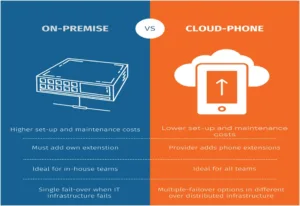
When it comes to voice communications, the cloud has taken the lead in the fight between cloud and on-premises.
A growing number of enterprises are opting for Unified Communications as a Service (UCaaS) models as part of their cloud migration.
While cloud solution deployments have increased recently, On-premises PBX migration has increased.
In recent data, 38% of organizations will have higher levels of remote working when companies start bringing people back into the office on a global scale. Because of this, employers are still looking to increase worker productivity by giving workers greater tools and flexibility, such as voice, video, and collaboration capabilities.
Most firms no longer require the same level of communication that a conventional PBX might. More and more workers are doing their work remotely, from home or another location.
What are the Benefits of Cloud-based PBX adoption?
Moving from on-premises PBX to the cloud has many advantages than we can ever imagine. You have the liberty to improve almost all dimensions of your business operations.
Here’s how your business can benefit from transitioning to cloud telephony. So read on!
1. Easy integration with third-party apps
UCaaS is built on the foundation of cloud solutions’ seamless integration with line-of-business apps, which is a feature that is always evolving. Workers will value being able to start conversations as part of their work right from their applications. Zoom frequently introduces connectors for apps tailored to particular industries.
2. It Promotes Business Continuity
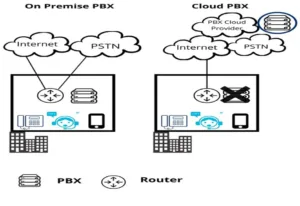
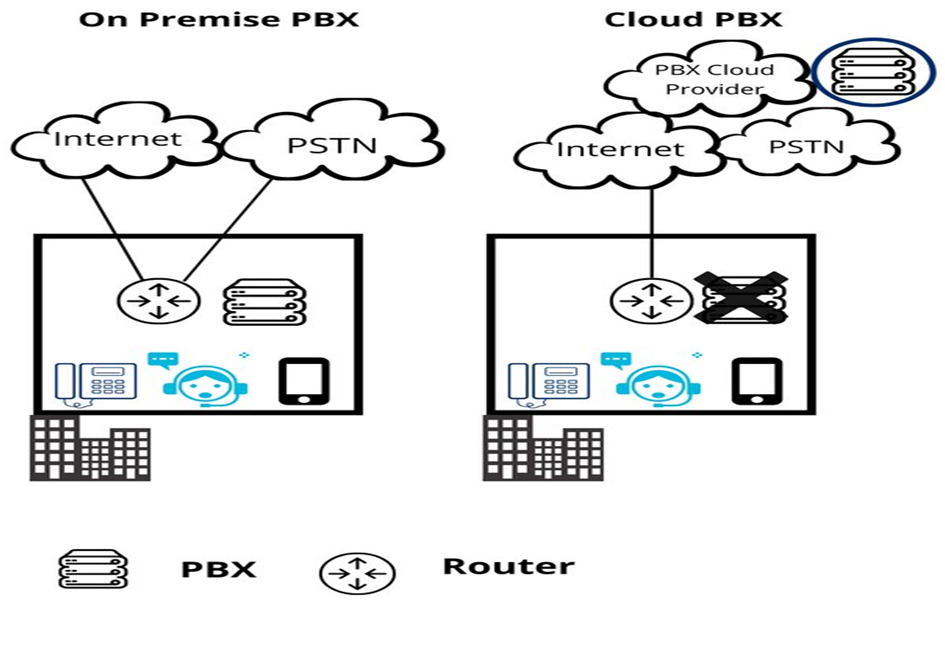
The likelihood of a service interruption caused by on-site hardware and trunks connecting to the PSTN network is eliminated by cloud apps and connection choices.
The logic, features, and connection of the cloud PBX service are based on geographically redundant and dependable data centres in the cloud, enabling customizable call routing and answering options at all times.
Companies can promote a single unique number via a variety of channels, including chat, SMS, phone calls, and additional features like video conferencing, whiteboarding, collaboration, and flexible meeting spaces. Workers may be productive from anywhere at any time using any device.
3. It Offers Mobility
Most of these hybrid office communication solutions, like Zoom and other cloud communications platforms, offer a strong desktop and mobile experience, enabling customers to access their business phone from any location. With unified communications in hybrid workplaces, employees will always have a consistent, easy user experience with a single application, regardless of their device or location.
4. It offers a single-platform user experience
Previously, web conferencing and messaging required separate software, as a legacy PBX was only capable of handling phone calls.
With today’s unified solutions, a user can only access the entire range of communication modalities through a single platform and one client. Installing and learning a single client makes user onboarding and adoption considerably simpler.
5. It provided worldwide accessibility
Through a strong worldwide network, cloud data centres can be constructed for global reliability, in contrast to on-premises systems that are built on on-prem hardware. Because of its intrinsic traffic routing capabilities, this resilience enables users in any location and optimises real-time communications.
6. It provides room for Scalability
In cloud communications, you can scale up or down according to your business needs. You can easily right-size your communications solution by using only the resources you need. To add employees or locations, you just add users to the license, which creates a new account. To deactivate users, you can use the administrator portal.
7. It comes with the total expense of possession
In recent times, the trend of digital transformation has prompted firms to restructure their business processes and utilise novel technologies to enhance teamwork, foster agility and creativity, and maintain a competitive edge in their industries.
Regardless of their size, microbusinesses, small and medium-sized businesses (SMBs), and enterprises can all benefit from the economies of scale and security provided by cloud providers when using cloud communications.
They may lower the total cost of ownership (TCO), boost user productivity, and enhance business outcomes by including their calling needs in larger digital transformation projects.
8. The whole setup is Manageable
An administrator can easily access a cloud communications system from any location with an internet connection by using a web portal for administration and management.
Furthermore, Zoom creates administrator portals that are simple to use and intuitive, eliminating the need for IT specialists to manage the system.
9. It promotes Innovation and agility
Cloud solutions are always coming up with new features and functionalities. There is a regular software release cycle that includes these changes.
Companies profit quickly from the cloud’s lightning-fast adoption of security updates, bug patches, and new features without having to deal with the hassle of maintaining on-premises solutions.
Benefits of Hybrid Office Setup
New work arrangements, such as the hybrid work model, have gained popularity after the coronavirus outbreak. Employers and employees have both benefited from the enhanced productivity and flexibility that it brought forth.
Because of this, the majority of businesses—including massive conglomerates like Microsoft—retain these flexible employment patterns.
In this section, we’ll go over ten advantages of hybrid work models as well as wise suggestions for putting flexible work models into practice.
1. Accessibility of a larger talent pool
A hybrid workplace expands the scope of an employer’s talent hunt beyond local borders.
Employers can access a large global talent pool through the hybrid model, which diversifies the workforce.
In addition, bringing individuals from various cultures and experiences together fosters innovation within remote teams by bringing in new ideas and perspectives.
2. Lowers operational expenses
Businesses can save operational costs by implementing hybrid workplaces, particularly when it comes to infrastructure and logistics.
For instance, by reducing the need for actual office space, remote workers help you save money on utilities like office supplies and rent.
Also, not having to offer meals and drinks to staff members who work remotely can help save costs.
Additionally, you’ll save money on cleaning and other maintenance services if you have fewer in-office staff. All these are just a few costs that could be taken off your shoulders.
3. It enhances the work-life balance of employees
A LinkedIn survey indicates that 86% of professionals think a better work-life balance requires hybrid work. Approximately 48% of participants ascribed this to allocating equivalent time to both personal and professional objectives.
Since a hybrid workplace balances office and remote work, a hybrid worker has enough time for personal obligations. For instance, you can arrange to pick up your children from school, fit in a daily jog, or take care of an elderly relative during their lunch break.
Employee happiness and work-life balance can both improve with this sense of self-determination.
4. It boosts worker productivity
Many workers believe that their productivity is impacted by their workplace.
According to Stanford research, employees who work remotely are 13% more productive than those who operate in regular office settings.
For this reason, switching up the workplace within a hybrid team can boost output, particularly for lone projects.
Conventional workplace environments may not have the necessary natural light, ventilation, or space, nor do they leave much opportunity for customisation.
Therefore, letting workers work from anywhere they choose might reduce the distractions that come with having an actual office.
5. It gives workers greater flexibility
In the old working model, workers would make the whole eight-hour commute to the workplace and then leave to go home.
On the other hand, the hybrid work style provides increased independence and flexibility for both remote and office workers.
For instance, a hybrid worker can choose to work into the evenings and take extended lunch breaks if doing so would be beneficial.
Comparably, a worker who works best in silence can accomplish more in a quiet workspace than in a bustling office.
This flexibility increases worker happiness by enabling workers to maximise their working hours.
6. It Enhances Mental Health
Worker wellness is an important consideration that organisations shouldn’t ignore.
According to a survey by Achievers, 28% of workers stated that receiving more assistance for their well-being would make them feel more appreciated at work.
Employees who choose the hybrid work paradigm have more time to be with their loved ones, prioritise their health, and take care of themselves.
Encouraging employees to take care of their mental health may help them perform better in their responsibilities, which will enhance productivity for the company.
Your Take Home
The strategic shift from an on-premises PBX to a cloud-based telephony system represents a transformative leap toward enabling the hybrid office model.
The PBX to cloud migration strategy not only unlocks a myriad of benefits but also aligns seamlessly with the evolving dynamics of modern workplaces.
Embracing cloud telephony advantages, such as enhanced flexibility, scalability, and cost-efficiency, fosters a dynamic and adaptable work environment.
One key player that significantly contributes to the success of this migration journey is Telco ICT Group. Our expertise and resources play a crucial role in navigating the complexities associated with transitioning from on-premises solutions to the cloud.
Telco ICT Group can provide tailored solutions, ensuring a smooth and efficient migration process. Our specialised knowledge in telecommunications and information and communication technology equips organisations with the necessary tools to optimise their communication infrastructure.
Frequently Asked Questions
- Is my medical information safe if my doctor is working from home?
Yes. When doctors work remotely, they don’t just use a regular home phone or email. They use a secure, encrypted connection (often called a VPN) that acts like a private tunnel directly to the hospital’s servers. This ensures that your records stay behind the hospital’s high-tech firewalls, even if the doctor is sitting in their home office.
- Do I need to download a special app to talk to my nurse or see my test results?
Not necessarily. Most modern systems are “browser-based,” meaning you can join a video call or view results just by clicking a secure link sent to your email or phone. While some hospitals offer an optional app for convenience, the goal is to make it as easy as possible for you to connect using the tools you already have.
- Will I still be able to call the office if the internet goes down?
Yes. Healthcare providers use “hybrid” systems, which means they keep traditional landlines or backup satellite connections active for emergencies. If the main internet goes out, the system is designed to automatically “failover” to these backups so patients can always get through.
- Will this new system stop me from having to play “phone tag” with doctors all day?
That is the main goal! Instead of leaving voicemails, you can see a doctor’s “Presence Status” (knowing instantly if they are in surgery, with a patient, or available). You can then send a secure instant message or a quick “click-to-call” request. It moves the conversation from “call me back” to “here is the answer right now.”
- How long will it take me to learn how to use this new software?
The software is designed to look and feel like the apps you already use on your smartphone, like WhatsApp or FaceTime. Most staff feel comfortable with the basics (messaging and calling) after a single 30-minute orientation session. Because it integrates with your existing workflow, it usually feels like a tool that helps you rather than an extra chore.
Table of contents
Related Posts

We’ll handle the tech
so you can get on with
running your business.